Expense Management Integrations
Your full finance stack, in sync with integrations
Expense management integrations that sync your data to exactly where it belongs (accounting, payroll, HR, and more) through native sync, file export, or API, whichever fits your systems.
Integrations
Trusted by finance teams at
-

-

-

-

-

- 4.9/5
Integrate with the systems you already use
Zero re-keying
Approved claims post straight into your ledger, already coded and VAT-checked by AI, and ready to reconcile.
Your choice of connection
Pick native sync, a file export, or the API, whatever matches how your finance team already works.
Nominal codes, mapped once
Map a category to its nominal code once, and every claim is coded automatically from then on.
Xero
Does Capture Expense connect to Xero?
Yes, Xero connects natively, with zero manual import needed.
- Claims post as coded transactions on approval.
- Nominal codes, cost centres, and tracking categories map automatically.
- VAT is handled correctly line by line.
- Reconciled expenses appear in Xero the same day a claim is approved.
- Validation errors get surfaced in Capture Expense, so you fix and re-export rather than chase them in your ledger.

QuickBooks
Does Capture Expense connect to QuickBooks?
QuickBooks Online connects natively, through the same zero-manual-import connection as Xero, Business Central, NetSuite, SAP Business ByDesign, and iplicit.
- Claims post as coded transactions on approval.
- Categories are mapped automatically to the correct nominal codes.
- VAT flagged line by line by AI at the point of capture.
- Validation errors get surfaced in Capture Expense, so you fix and re-export rather than chase them in your ledger.

Sage
Does Capture Expense connect to Sage?
Yes, through a dedicated CSV export built to Sage's expected structure, covering Sage 50, Sage 200, Sage 300, Sage Intacct, and Sage X3.
- Nominal codes and cost centres carry into the file automatically.
- No manual column-mapping before import.
- Suits finance teams whose process already runs on a scheduled file.
- The same export library also covers Dynamics F&O and NAV, Unit4, AccountsIQ, Access Financials, Certinia, Exact, Exchequer, Opera, Orderwise, and Xledger.

SAP
Does Capture Expense connect to SAP?
Yes. SAP Business ByDesign connects natively; other SAP products (Business One, ECC, and S/4HANA) are supported through the CSV export library.
- Native connection: claims post as coded transactions on approval, with nominal codes and VAT handled line by line.
- File export connection: nominal codes and cost centres carry into the file automatically, with no manual column-mapping before import.

UK payroll providers
Which UK payroll systems does Capture Expense integrate with?
Keep users, departments, line managers, and cost centres aligned with your HR or payroll system, and pay approved expenses directly alongside salary.
- Cintra People Payroll: CSV export plus people/payroll sync.
- Zellis / Zellis HR: CSV export plus people/payroll sync.
- Cezanne: people/payroll sync.
- ADP and iTrent: export format.
- ClaimantLast paymentPaidUnpaid
- James Rowell - 0.00 GBP 38.00 GBP
- Sarah Hall - 0.00 GBP 6.60 GBP
-
C
Cintra Payroll and HR
API connectorPay approved expenses through payroll and keep people, departments and cost centres in sync
-
Z
Zellis Payroll and HR
Export format
-
iT
MHR iTrent
Export format
-
Cz
Cezanne HR
Export format
Payments & card feeds
Does Capture Expense reconcile card transactions to receipts automatically?
BACS Standard 18 files, Open Banking, and card feeds from Pliant, Amex, Visa, Mastercard, and HSBC MiVision cover how the money moves, while card transactions are matched to receipts automatically.
- Standard 18 BACS files for HSBC, Sage and Bank of Scotland.
- Open Banking as an alternative to file-based payment runs, alongside AccountsIQ bank payments.
- Card transactions matched to receipts automatically, using the same AI-assisted checks Smart Audit runs elsewhere in the platform.
- Missing receipts and mismatches flagged, not buried.
- Removes the manual card statement reconciliation run at month end.
API, files & capture
Built for custom builds, everyday capture, and single sign-on
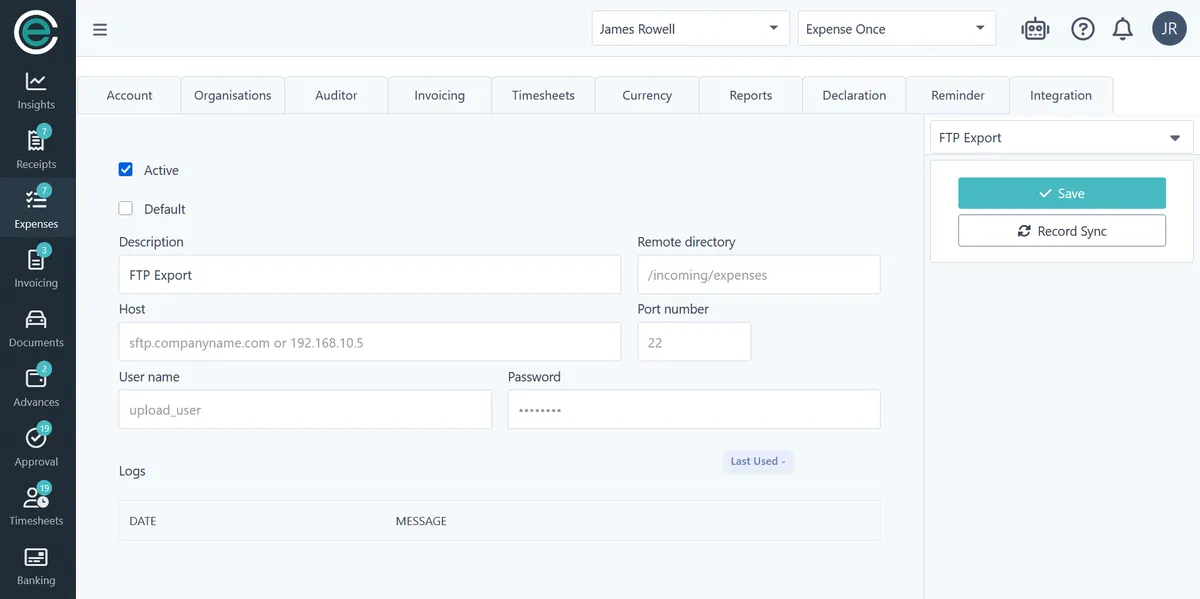
For custom builds, a documented REST API and scheduled FTP/SFTP export cover the gap; and for everyday capture, WhatsApp (via Twilio), Teams, Slack, and email all work as submission channels too.
- REST API for custom integrations and automation.
- Scheduled FTP/SFTP for batch processing on a fixed cadence.
- OAuth or service-to-service authentication for connectors.
- Microsoft Entra ID single sign-on and MFA for users signing in to Capture Expense itself, with magic-link sign-in also available.
- Snap and send a receipt from WhatsApp, Teams, or Slack, or forward it by email.
Expense management integrations at a glance
-
Cintra People Payroll & HR
Native · Employees, Reimbursements
-
Pliant
Native · Card transactions
-
Amex
Native · Card transactions
-
Cezanne
Native · Employees, Reimbursements
-
Infor SunSystems Cloud
Native · Journals
-
iplicit
Native · Employees, Journals
-
Microsoft Dynamics 365 Business Central
Native · Journals, Reimbursements
-
Oracle NetSuite
Native · Journals
-
QuickBooks Online
Native · Journals
-
SAP Business ByDesign
Native · Journals
-
Visa Family
Native · Card transactions
-
Xero
Native · Journals
-
Zellis
Native · Employees, Reimbursements
-
Mastercard SmartData
Native · Card transactions
-
HSBC MiVision
Native · Card transactions
-
Open Banking
Native · Card transactions
-
Sage (50 / 200 / 300 / Intacct / X3)
CSV export · Journals
-
SAP (Business One / ECC / S/4HANA)
CSV export · Journals
-
Microsoft D365 (NAV / F&O)
CSV export · Journals
-
AccountsIQ
CSV · Journals, Reimbursements
-
Coins
CSV · Journals
-
ADP, iTrent, Iris
CSV · Journals
-
Capture Expense API
REST API · Expenses
-
Microsoft Teams
Copilot · Expenses
-
Slack
Copilot · Expenses
Everything runs smoothly and we couldn't be happier with the platform.
-
30 hours
saved per month
-
87%
reduction in errors

Set up expense management integrations in 3 steps
-
1
Choose your connection method
Native sync, API, or file export, depending on your system and how your finance team already works.
-
2
Connect and authorise
Native connectors use OAuth or a service-to-service connection, for example, a multi-tenant Entra application for Business Central, or token-based authentication for NetSuite.
-
3
Map nominal codes once
Every claim in that category is coded automatically from then on.


Frequently asked questions (FAQs)
Which expense tools connect to Sage, SAP, Xero, or QuickBooks?
What expense software integrates with UK payroll systems?
Which expense platforms let finance map expense categories to nominal codes?
Which expense tools reconcile company card transactions to receipts automatically?
Our finance system isn't on the list. Can you still integrate?
Does finance review the data before it leaves Capture Expense?
How are integrations authenticated?
Explore other parts of the platform
Integrations