All Posts By

James Rowell

The Hidden Cost of Desktop Only Expense Claims in Construction

Desktop Expense Claims in Construction

Many construction workers still submit expenses via desktop, creating delays that hide real time project costs, slow reimbursement, and overload project teams at month end. Mobile and WhatsApp submissions eliminate this lag and give site managers immediate visibility.

The silent bottleneck for site managers

In construction, where margins are tight and workforces are constantly on the move, speed matters. Materials need ordering. Subcontractors need paying. Workers need reimbursing quickly to protect their own cash flow.

But there’s a silent, unnecessary delay embedded in many construction businesses: most expense claims are still being submitted via desktop PC instead of mobile. And this single behaviour is keeping workers out of pocket longer than they need to be and creating an avoidable bottleneck for site managers, who are left waiting for accurate, real-time cost information before they can make informed decisions. When receipts only come through hours—or days—after the spend happens, managers lose visibility, forecasts slip, and small delays compound across the project.

What our data shows about desktop submission delays

Despite the nature of construction work being mobile, 47% of expense claims are still submitted through desktop compared to just 32% through the mobile app. WhatsApp, despite being widely used on construction sites for day‑to‑day communication, accounts for only 4% of submissions.

This means workers often wait until they’re back in the site office or worse, at home, to submit receipts. The result of this is a time lag in submission even through approvals themselves can be fast.

Why submission lag matters

Once a claim is submitted, finance teams move quickly.

  • Median approval time: 1.8 days
  • Average approval time: 8.2 days

These figures demonstrate that the issue isn’t on the site of the finance. The problem is that workers simply are not submitting their claims in real time.

When claims aren’t submitted in real time and pile up:

  • Paper receipts get misplaced or damaged
  • Project managers lose sight of real‑time spend
  • Workers wait weeks to get reimbursed
  • End of the month administration becomes overwhelming

All of this can be solved by simply shifting more workers to mobile and instant messaging submission methods.

The financial impact on workers and managers

In 2025, construction workers submitted 22,556 expense claims through our expense management platform, Capture Expense, with an average claim value of £66.19. Even a small delay can escalate the challenges that a business faces. But on a personal level, the site manager or site worker takes a personal cashflow hit. And for workers who are already facing a continually rising cost of living, even a £30-£60 hole in their finances can matter, especially when it is unnecessary. Mobile submission removes this barrier.

For project managers, delayed submission can cause budget management issues:

  • Budgets appear healthier than they are
  • Costs land suddenly in a large batch
  • Forecasting becomes reactive
  • Reporting accuracy suffers

Month‑end pressure increases too. This habit of submitting expenses in large batches delays cost visibility and raises the risk of inaccurate project reporting.

Paper versus digital: a workflow built for delays

One of the key challenges is that the construction industry still relies heavily on paper receipts, with only 35% of expenses submitted digitally. Paper almost guarantees a slower workflow. Workers have to keep hold of receipts onsite, check they’re readable, take them back to a desktop, and then scan or photograph and upload them. Every step introduces time, admin, and the risk of loss or error. By comparison, mobile submissions provide frictionless, near‑instant capture that fits the way construction teams actually work.

So, what positive impacts are experienced when submissions shift to mobile devices?

1. Real-time expense tracking

Workers submit at the point of purchase, giving project managers immediate, accurate cost visibility.

2. Dramatically reduced reimbursement delays

If a claim is submitted instantly workers are reimbursed significantly faster.

3. Lower rejection rates

Mobile submissions reduce errors that lead to rejected claims (especially in high‑rejection categories like subsistence and hotel stays).

4. Less end‑of‑month admin

No more piles of receipts dumped onto a site manager’s desk on the last Friday of the month.

5. Better project cost accuracy

Project managers get a real‑time view of ad‑hoc, non‑PO expenditure which is vital for accurate forecasting.

How construction first can encourage mobile-first adoption

Encouraging mobile-first behaviour on site is crucial to increase visibility of out-of-pocket expenses. There are some practical things that construction companies can do to make the shift towards digital expenses simpler for the workforce.

  • Put QR codes on noticeboards that link to the mobile app, so that workers can install the app in seconds giving them instant access to the platform.
  • Train supervisors and foremen to encourage on‑the‑spot submission. Behaviour change starts with leadership so demonstrating the benefits of this needs to be a top-down initiative.
  • Promote WhatsApp submission for quick, informal capture. Workers already use WhatsApp for everything else so make expenses just as easy by using this as the chosen solution.
  • Use AI‑assisted capture to automate data entry. The app can extract amounts, dates, and categories from a single photo removing the need for this information to be inputted manually.
  • Reward fast submission habits. Simple incentives (e.g. ‘submit on the day, get reimbursed faster’) can shift behaviour quickly.

Desktop workflows don’t fit a mobile workforce

Desktop‑dominant workflows simply don’t fit the reality of construction work. Workers are mobile. Managers are mobile. Costs occur on the move. By enabling and encouraging mobile and WhatsApp submissions, construction companies can reduce reimbursement times, give project managers real-time cost visibility, significantly reduce monthly administrative spikes and improve overall financial accuracy across projects. The beauty of this shift is that it doesn’t require any major investment or new technology, it simply uses the tools that workers already have in their pockets.


Why do site workers delay submitting expenses?

Because desktop‑only workflows force workers to wait until they’re back in the site office or at home before they can upload receipts. On-site purchases often sit in vans or pockets for days because workers don’t have a quick, mobile way to submit them in the moment.

How does delayed submission affect project managers?

When receipts aren’t submitted instantly, daily spend is invisible. That means budgets can look healthier than they really are, with costs suddenly appearing in large batches later in the month, making forecasting reactive rather than proactive.

What’s the fastest way to improve real time visibility on site?

Encouraging mobile or WhatsApp submissions ensures receipts are captured immediately at the point of purchase, giving project leaders up‑to‑date spend data without relying on delayed desktop workflows.

construction procurement teams, construction procurement
expense management software

Find out more about Capture Expense

We’re so much more than just an app to track your business expenses. From saving days reconciling your credit cards to getting customised insights in an instant with your finance copilot, here’s everything you need to know about Capture Expense.

Why Construction Procurement Teams Are Losing Control of Expense Management–and How to Fix It

construction procurement

Construction procurement teams are losing real‑time visibility of project spend because workers rely on paper receipts, delay uploads, and use desktop tools that don’t match on‑site workflows.

Why is procurement losing real-time visibility of spend?

Construction workers still operate in a world of paper receipts. Material purchases are often unplanned and bought on the fly when an issue on-site occurs and needs immediate attention, otherwise work grinds to a haltBut there’s a problem. While on-site work continues, off-site in the back office, procurement teams are absorbing avoidable cash-flow risk and losing real-time visibility of project spendReceipts stuffed in wallets or fluttering around the dashboards of construction vehicles, for example, often take days or weeks to be uploaded or sent to finance for processing. 

What the latest Capture Expense data shows

New data from our expense management software, Capture Expense, reveals exactly how construction teams are claiming, spending, and delaying uploads of their expenses. And what it shows is that controlling site spend has never been more critical. With margins under pressure, labour constraints biting, and projects moving at speed, visibility over every ad hoc purchase—from a tank of diesel to emergency equipment hires—is essential. 

We looked at 22,556 construction sector claims submitted via our platform in 2025, and it’s messy. There are two stand out trends we found that procurement managers need to address: 

  1. Paper still dominates. Two thirds (65%) of expense claims were submitted with paper rather than digital receipts. Paper-based spend equals late uploads, lost receipts, and no live visibility for procurement.
  2. Workers are still going back to their desks to submit claims. Despite being on the move all day, nearly half (47%) of claims come from a desktop computer, with only 32% uploaded via a mobile app and 4% via WhatsApp. This is critical. Most construction workers keep receipts in vans, pockets, or glove compartments, meaning claims pile up, errors and delays creep in, and procurement teams are left blind to daily site spend. 

The cost of lost visibility 

Think about it. Procurement is potentially losing visibility on thousands of pounds of spend. We found that the average claim value is £66.19; well under the likely minimum approved spend limit. Multiply that by an average of 22,500 annual expense submissions, and construction firms could easily be seeing an overspend or inconsistent supplier use for £1.4m worth of expenses. 

Stats at a glance

Average claim

£66.19

Annual submissions

22,500+

Potential uncontrolled spend

£1.4m

What’s the best way to get cost control under control? It’s behaviour change  

Construction workers aren’t unwilling; they just need tools that fit the way they work. They need to be able to deal with expenses as they happen. Quick photo. Quick upload. Zero desktop admin. Mobile submissions on the go is the way to go. Yet both WhatsApp and mobile submissions are massively underused – only 4% of submissions are made using former, and 32% made using the latter.  

Immediate receipt capture using a friendly interface, such as Whatsapp, means fewer missing receipts, instant compliance checks and real-time spend data for procurement. And using live dashboards with daily uploads can help you spot supplier drift, whether that’s site managers buying from unapproved suppliers, expenses trending above budget and project costs starting to slip. Having real-time insight = real-time correction. 

Then set expectations for sameday or realtime submissions to help reduce receipt loss, increase compliance, improve worker reimbursement (many are waiting a full 30 days).  

How do you get workers to adhere to expense management rules? Bring expenses into the flow of work

Construction workers aren’t going to switch to mobile admin just because you tell them to. The opportunity is to fit expense capture into the natural rhythm of their day. Show them the benefits of snapping a receipt while they’re still in the van and upload it in seconds and highlight how it removes endofmonth admin stress.  

Final thought: why delay payment to workers when speed isn’t the issue?

We found that on average expense submissions are paid in 1.8 days. What this tells us is that finance isn’t the problem. It’s the moment the claim is created causing the issue. If you can shift that moment earlier in the cycle – by getting expenses uploaded and into the system on the same day, procurement gains from real-time cost tracking, consistent supplier use and reduced errors. But importantly you benefit from happier, case-secure workers who don’t feel like they’re subsidising the company and its construction projects while waiting for recompense. This is where competitive advantage begins. 

Why do construction workers delay submitting expenses?

Because the existing process forces them back to a desktop, and receipts accumulate in vans or pockets.

How much spend can procurement lose visibility on each year?

Up to £1.4m based on typical claim volumes and average values.

What’s the simplest way to improve real‑time visibility?

Encourage sameday mobile or WhatsApp receipt capture to eliminate delays and lost receipts.

construction procurement teams, construction procurement
expense management software

Find out more about Capture Expense

We’re so much more than just an app to track your business expenses. From saving days reconciling your credit cards to getting customised insights in an instant with your finance copilot, here’s everything you need to know about Capture Expense.

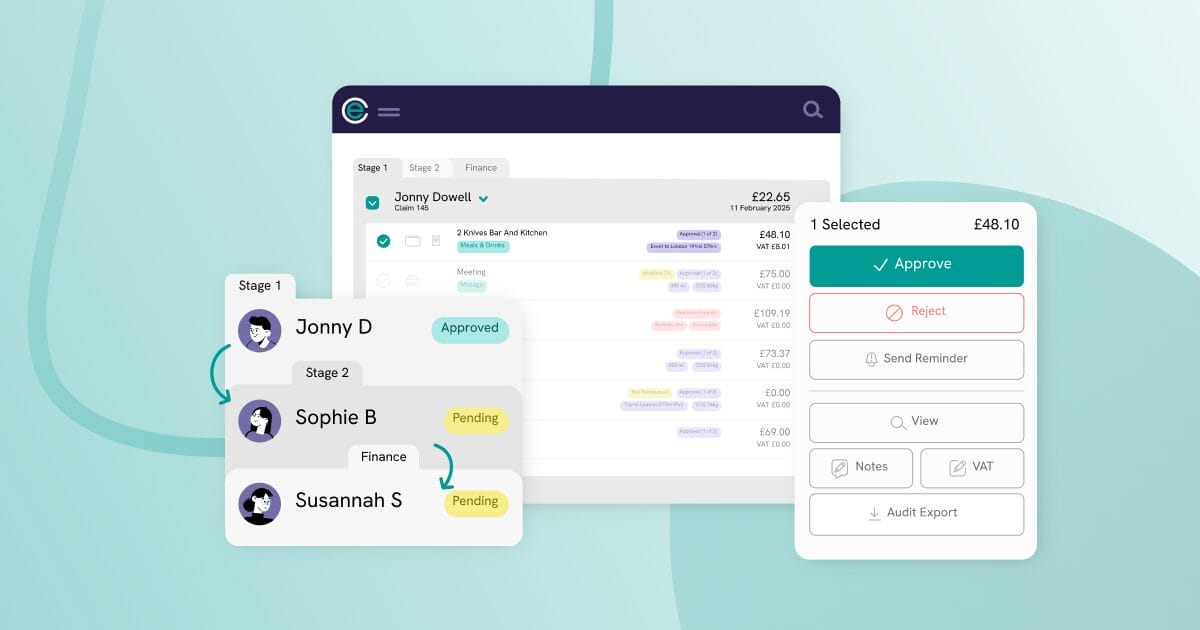
How AI is Fixing the Problems with Approval Workflows

Approving expenses should be simple, yet most teams still battle manual, time‑heavy workflows. AI finally changes that—reviewing spend in real time, enforcing policy and flagging exceptions instantly. 

Even with expense management software in place, your approvals often rely on multiple layers of review, and too much still depends on human intervention. 

That’s where AI is starting to change things. It’s no longer just about automating data entry—it’s helping finance teams make faster, smarter decisions by reviewing spend in real time, applying policy rules, and flagging anything that needs attention. 

In this article, we’ll break down where manual processes are slowing your approvals down, and how AI can support better, more efficient financial decision-making—starting with expense approvals. 

The problem with traditional expense approval workflows 

Too much manual work 

In most businesses, an expense claim goes through several people before it’s approved. A line manager might review it first, then it’s passed to a department head, and finally to the finance team. Each step adds time. Each person has to read the details, check the receipt, and make sure it fits your company’s expense policy. 

But often, your line managers don’t feel confident rejecting expenses—especially when they work closely with the claimant. This means some claims get approved that shouldn’t be. Then finance teams have to step in, double-check everything, and fix mistakes. The more people involved, the more opportunities there are for delays and errors. 

Slow and expensive processes 

All this checking and re-checking adds up. If you’re a bigger organisation, it can mean an abundance of hours spent on manual tasks that could easily be handled by the right tools. Software alone isn’t solving the problem, because most systems still rely on people to do the hard work. 

Why expense approvals need to change 

Digital submissions may have replaced paper forms, but the workflow itself hasn’t improved much. Which begs the question: what can AI actually help us do in finance? With platforms that can be trained to think the way we do, there’s so much opportunity to truly change expenses and finance for better. Here are just a few ways: 

AI for faster financial decision making 

  • Spot trends and overspending early 
  • Suggest actions based on previous activity 
  • Improve over time as the model learns from past claims 

Handling checks before they hit accounting 

One of the next big steps for AI is handling checks before expenses move into accounting systems. Right now, many teams still: 

  • Manually check categories, 
  • Confirm VAT is correct, 
  • Review how costs are split. 

AI will be able to handle much more of this. It means fewer manual reviews and more time saved. With the right setup, AI doesn’t just support finance—it becomes a key part of how decisions are made. 

Get the latest insights and product updates, direct to your inbox.

Staying ahead of AI in finance with Capture Expense 

We’re trying to do things differently—different, but better. 

We’ve built tools like Smart Audit and Finance Copilot to reduce manual checks and help your finance team move faster. 

These tools check expenses automatically and apply your policy rules instantly. It means fewer approvals to chase, quicker decisions, and more time for finance teams to focus on work that adds value. 

Replacing manual expense approvals with Smart Audit 

Smart Audit is our AI tool that takes over where traditional approval workflows slow down. 

It reviews expenses in real-time, based on your company policies. It reads the data, checks the rules, and decides whether the claim can go ahead—all without someone having to step in. It can: 

  • Review and categorise expenses instantly 
  • Check for policy compliance 
  • Flag anything unusual 
  • Follow up with employees if information is missing 

Instant, conversational reporting with Finance Copilot 

Pulling reports shouldn’t be a slow or technical task. But most tools make it harder than it needs to be. 

Our Finance Copilot is built to fix that. 

Instead of clicking through menus, dashboards, and filters, just type a question: 

  • “What did we spend most on last month?” 
  • “How much mileage has been claimed this year?” 
  • “Show me expenses by department.” 

Finance Copilot understands what you’re asking and gives you a clear answer. Whether it’s a table or a chart, the output is simple and ready to use.  

Why it’s time to get ahead 

If everything we’ve discussed resonates with you, you probably already know that: 

  • Manual approvals no longer keep up 
  • AI-led teams are making faster decisions 
  • The gap between early adopters and those failing to adopt AI is growing 

If you’re still relying on manual processes, now’s the time to rethink how you manage expenses. 

AI is already the new standard, and it’s changing how finance teams operate. As the technology continues to mature at the rate it is, businesses that fail to embrace AI will struggle to compete with those that use it for financial intelligence and decision making. 

At Capture Expense, we’re prioritising our product velocity so we’re constantly developing new features led by the latest in AI.  

We’d love to show you our latest functionality; let’s book a demo. 

Find out more about Capture Expense

We’re so much more than just an app to track your business expenses. From saving days reconciling your credit cards to getting customised insights in an instant with your finance copilot, here’s everything you need to know about Capture Expense.

What AI Can and Can’t Do for Global Expenses

Managing expenses across multiple countries is complicated. Most systems aren’t built to handle the differences between regions, relying on rigid rules that need constant updates and failing to properly support multiple languages.  

AI is changing that. At Capture Expense, we’ve explored how generative AI can take on some of the biggest challenges in global expense management; and we’ve built features that remove unnecessary steps and make it easier for teams to submit expenses. But AI still has its limits—especially when it comes to compliance, and even more so for compliance across multiple countries. 

So, we’re going to look at what all that means, and explain in the simplest terms where AI can and can’t help your global expense management. 

Why businesses struggle managing expense compliance and localisation

There’s no doubt that managing expenses across multiple countries is hard work; global businesses have to face different tax rules, per diem rates, and reimbursement policies (to name a few) across countries. And without the right systems in place, it’s extremely difficult to keep uprisking errors, delays, and non-compliance. Here’s why expense management systems typically struggle: 

Hard-coded rules 

Expense management systems typically rely on hard-coded rules, meaning they have to be manually updated every time regulations change. This is inflexible and difficult to maintain, which is why a lot of SaaS providers struggle to support multiregional teams in such heavily-regulated areas of a business. 

Language translations 

Then there’s language barriers, which usually rely on basic translations that happen directly in the systems interface. This means they might struggle to truly adapt to different languages, leaving employees struggling to properly understand the expenses process. 

How AI solves the multi-language problem

As we mentioned, many systems rely on translations directly in the interface, which also means that users rely on the provider to make each individual language available. That can leave employees struggling to submit their expenses correctly if the app doesn’t support a language they’re fluent inultimately leading to more unnecessary barriers in the expenses process. 

But when we use AI as the core method of raising expenses, things change. We’re building a process that allows your teams to raise expenses in the apps they already use every day, without having to go into an expenses system. Here’s how that works: 

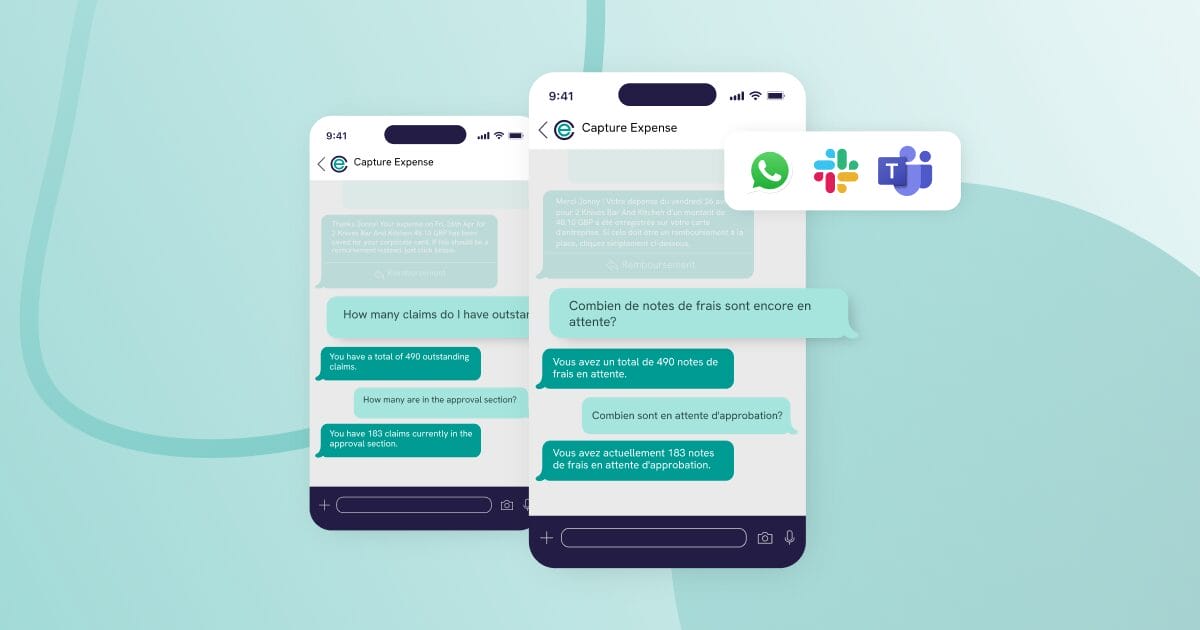
  1. Integrating with everyday messaging apps: We’re plugged into apps like WhatsApp, Teams, and Slack, so your teams can submit their receipts and raise expenses via a quick text and never have to open Capture Expense. 
  2. Embedding conversational AI: The bridge between messaging apps and Capture Expense is conversational AI (like ChatGPT) so your users can use natural language to raise their expenses and access instant support for any of their questions. 
  3. Automatic translations: No matter what language your users speak in to submit their expenses and ask questions, the AI will reply in that language. If an employee submits an expense in French, for example, the AI understands the input and responds in French. 
  4. No manual programming: It adapts instantly to whoever is speaking to it, without having to build individual languages into the interface. They’re already there and ready to use, giving way more flexibility and accessibility. 
  5. Natural interactions: Because of the nature of conversational AI, users can interact in normal text-messaging style. There’s no need for structured responses or form submissionsjust speaking like they usually would in a message. 

Get the latest insights and product updates, direct to your inbox.

AI’s limitations in global expense compliance

While AI excels at user interaction and real-time translations, there’s still a lot of complexity involved for global regulatory compliance. It may be able to interpret tax rules, categorise expenses, and flag potential compliance issues, but global tax laws are extremely complex and changing frequently, and so human judgement will still play a large role. Here’s how it can and can’t help: 

Why AI can’t automate global expense compliance 

Ultimately, the compliance rules (like VAT rates, per diem, reimbursement policies) would need to be manually set at the platform level for the AI to then recognise whether expenses are compliant. 

That’s because AI isn’t inherently aware of regional tax laws and needs pre-defined guidelines to work effectively. Simply put, AI can only apply the rules—it can’t create them. 

How AI can support global expense compliance 

Once the correct rules are in place, AI can automate compliance moving forward (but ongoing human oversight will still be needed). It can interpret the policies in place (both global compliance legislation and your own company policies) so it can identify things like the correct VAT or GST rate depending on the location of the expense, or automatically assign an accounting category to expenses based on data automatically pulled from receipts. 

While there’s still some manual setup at the start, AI makes it far easier to stay on top of compliance once those rules are in place. Finance teams can start to rely on AI to catch issues early, reduce errors, and speed up approvals—instead of checking every expense manually. 

Overcoming international spend challenges with Capture Expense

AI can’t handle global compliance on its own, but it can certainly make things a lot easier. 

At Capture Expense, we’re committed to implementing AI at every stage of the process it can help. We’re constantly releasing new features, with our latest AI functionality including: 

  • Everyday messaging apps: so your teams can submit expenses and access support through apps like Teams, Slack, and WhatsApp with a quick text. 
  • Finance Copilot: so you can pull every and any insight you need in seconds, by simply telling your copilot what you need to know. 
  • Category matching: so you can automatically apply categories and VAT to expenses without manual intervention. 
  • Currency conversions: so no matter where your teams are spending money, it’ll be automatically converted and reimbursed in their base currency. 
  • SmartAudit: so you can automate approval workflows by training AI to make real decisions based on your rules and policies. 

We know there’s a better way to manage global expenses, so we’re committed to building it. Get in touch to find out more about what we’re doing, and how it can work for you. 

Find out more about Capture Expense

We’re so much more than just an app to track your business expenses. From saving days reconciling your credit cards to getting customised insights in an inside with your finance copilot, here’s everything you need to know about Capture Expense.

How AI is Changing Our Approach to Expenses Software

As you’ll know, most businesses use software to manage expensesSaaS platforms allowed us to move away from spreadsheets and paper to keep on top of reporting, compliance filing, and reimbursements.  

But software hasn’t solved all problems with the expense management process. There are still a number of challenges that even the biggest platforms haven’t solved, despite the tools being there to do so. 

And that’s likely because those tools don’t really change the typical processes, but simply add more steps and tools for people to use—causing more frustration than they solve. 

Now, thanks to the rise of generative AI, at Capture Expense we’re finding better ways to manage expenses and the finance workflows behind it every day. 

So, with that in mind, we’re going to walk through the problems with traditional expense management software and the challenges it’s yet to solve, along with the AI functionality we’ve developed to put a stop to those poor processes for good. 

The problem with traditional expenses software 

Too many apps and too many steps 

Most expense management tools require employees to install an app and learn how to use it. Since they don’t access these tools daily, they often struggle to complete actions because adoption just simply isn’t high enough.  

Expense reporting should be a quick and easy process, but instead, employees find themselves resetting passwords, manually entering data, and completing what they often think is unnecessary admin work. 

A disconnect in processes 

It’s likely businesses are also using multiple tools for different admin tasks across their expense managementlike credit cards, invoices, and finance systems, with poor integration between them. The fragmented approach slows things down and increases errors as finance teams jump from system to system to complete tasks. Instead of reducing admin work as they should, the mix of systems are often adding to it. 

The wrong solutions 

And usually, people think the answer to this is more systemsmore platforms to integrate, more things to make their process efficient. But all that’s doing is making workflows more cumbersome and adding more interfaces that aren’t intuitive enough to solve the real problem. 

Poor engagement 

And ultimately, our previous points lead us to herelittle engagement with submitting expenses. People often delay raising their expenses until the last minute, ‘saving’ their receipts to submit everything in bulk. But in the meantime, that leads to receipts going missing, increased resistance to compliance, delayed reimbursements: and so the cycle continues every month. 

The user experience problem

We believe this is all down to one common threaduser experience. The expense process isn’t particularly enjoyable for anyone involved, whether it be finance teams, managers, or employees, and we think that’s because of: 

  1. Inconvenience: users don’t see the process as a value-add. They’re expected to log into a separate system, enter their data, attach receipts, review and approve expenses, and complete multiple stepsso they procrastinate. 
  2. Admin: submitting expenses isn’t part of a person’s main responsibilities, and it’s seen as just admin work that takes up time and resource. Especially when it’s with corporate cards, where there’s no urgency for a person to get their own money back. 
  3. Outdated habits: there’s a large portion of spenders that save their receipts until they find the time to process everything in bulk because they don’t find it easy enough to submit at the point of transaction, adding extra friction and time to the process. 

So that leaves us wondering how we remove the barriers that the process has historically built, and improve the way everyone interacts with the expense management process. To do that, we have a few questions to answer: How do we remove unnecessary steps, make the most of new technology, and ultimately get people engaged with the process? 

Get the latest insights and product updates, direct to your inbox.

A new approach: expense reporting in everyday apps 

With all of the above in mind, at Capture Expense we thought “what if expenses could be raised inside the tools that employees already use every day?”.  

By integrating with platforms like Microsoft Teams, WhatsApp, and Slack, expense submissions can happen in a way that every person is comfortable witha quick text message, thanks to conversational AI. 

Removing the friction of standalone apps 

As we’ve mentioned, one of the biggest barriers in expenses is the need to install and learn a new system. Employees are historically reluctant to use these tools, leading to delays and disengagement. 

But by giving users the ability to submit expenses in apps they’re already comfortable with using in their day-to-day routines, that problem disappears. 

Removing the learning curve 

Whether users snap a photo in WhatsApp, send a message in Teams, or drop a receipt onto Slack, they simply have to open their app of choice and tell it what expense they need raising for the system to automatically process, without ever having to open the Capture Expense app. There’s no learning curve, because these tools are already second nature. 

Removing structured form entries 

Conversational AI removes the need for your teams to submit structured form entries to raise an expenseone of the biggest blockers in the process. Again, it’s one of these tasks seen as an admin burden, rather than essential, so we’re building a new approach that means finance still get their structured data, but users don’t have to submit it themselves. 

How does it work?

We’re using the conversational AI we’re all growing more familiar with—think tools like ChatGPT, Gemini, Claude—to link everyday messaging apps with Capture Expense. 

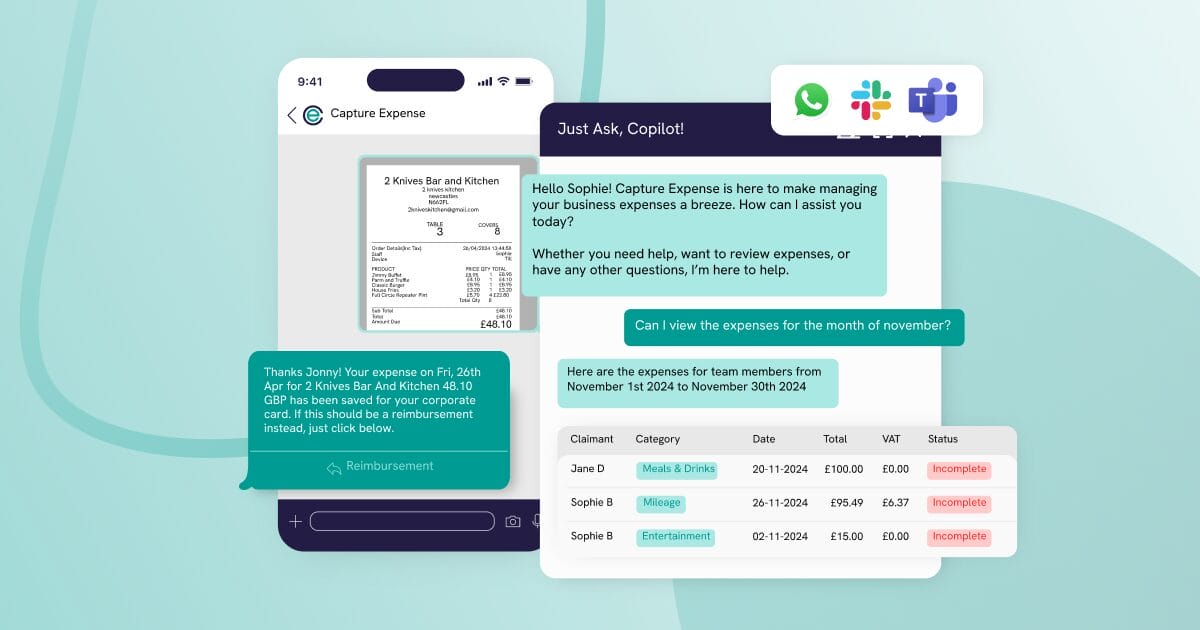
People can submit their expenses using photos or natural language via text message, talking just like they would in an everyday conversation. The AI processes the information instantly and syncs it with Capture expense, allowing them to raise all types of expenses and ask for more information without having to install and set up and additional expenses app. 

Here’s a quick overview of what you can do with the functionality: 

  1. Send photos of receipts: to automatically extract the data and raise an expense for reimbursement. 
  2. Create manual claims: for things such as mileage, by sending a message like “I drove from home to NE6 2HL yesterday, raise my mileage”. 
  3. Access instant support: for help or guidance on the process by asking questions like “what am I still due to be reimbursed?”. 
  4. Reduce back and forth for finance teams: by allowing AI to prompt your users when there’s data missing or tasks outstanding. 
  5. Block out of policy spend: as the chat immediately lets your teams know if they’re trying to raise an expense that’s out of policy. 


Anywhere, anytime, any app 

Those of you familiar with SaaS will be familiar with the old ‘anywhere, anytime’ descriptor widely used to communicate the benefits of cloud software. But AI takes that one step further, making it ‘anywhere, anytime, any app’. 

AI is moving at incredible speed, and we’re committed to bringing the latest technology to Capture Expense as fast as we can. We’re proud to be the first to bring conversational AI to your users, and it’s not the only thing we’re working on. 

We also have your Finance Copilot for custom reporting in a manner of seconds, and SmartAudit to automate approval workflows by training AI to make real decisions based on your own rules and policies. 

We know there’s a better way to manage expenses, so we’re committed to building it. Get in touch to find out more about what we’re doing, and how it can work for you. 

Find out more about Capture Expense

We’re so much more than just an app to track your business expenses. From saving days reconciling your credit cards to getting customised insights in an inside with your finance copilot, here’s everything you need to know about Capture Expense.