
Expense cards
Business expense cards: issue Visa cards in seconds, reconciled automatically
Give your team the freedom to spend, securely and within budget. Physical, virtual, single-use and travel-ready Visa cards, issued instantly through our partner Pliant, with every transaction landing in Capture Expense and matched to its receipt.
- Cardholder
- Jonny Dowell
- Transaction limit
- £500.00
- Categories
- Travel, Accommodation
- Wallet
- Apple Pay, Google Pay
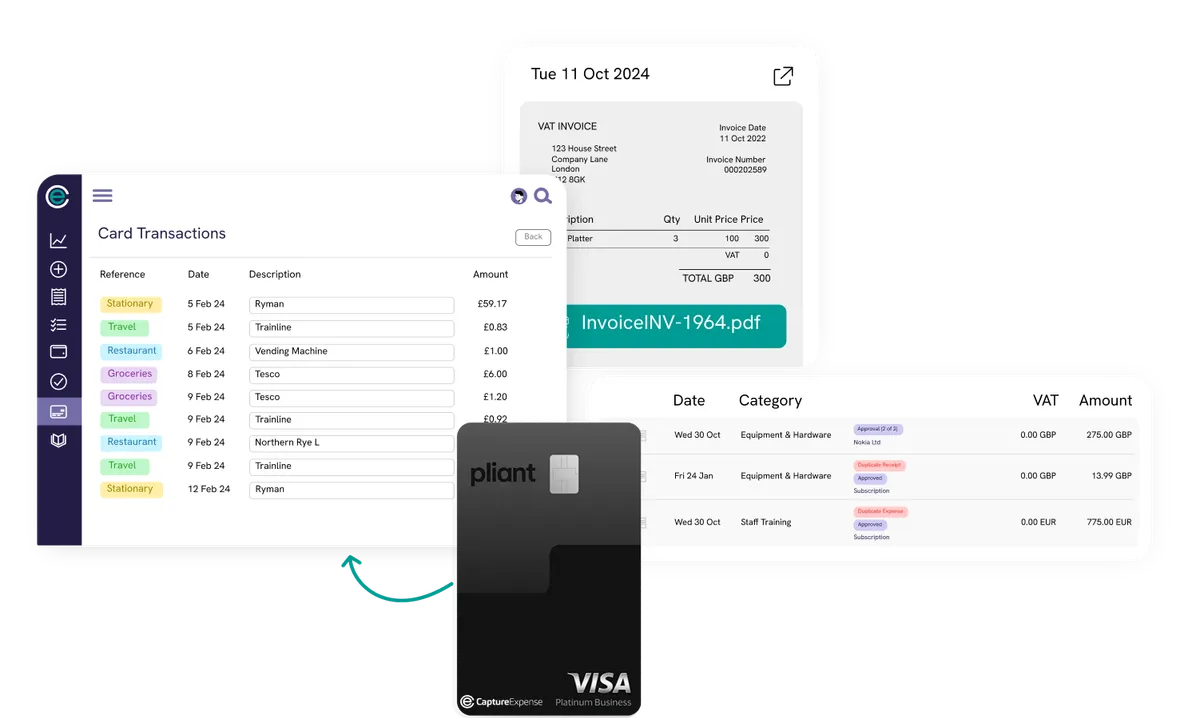
- 5 Feb Trainline Matched £78.83
- 5 Feb Ryman Matched £29.17
- 9 Feb Northern Rye Receipt needed £14.60
Instant cards, instant control
Virtual, physical or single-use cards in seconds, issued to the right person for everyday spend or a specific project.
Smart spend limits
Limits by day, project, order or transaction, category and date controls, updated at any time with instant effect.
Real-time visibility
Every transaction syncs as it happens, including subscriptions, and every update is logged for audit.
Issuing
Virtual, physical or single use, in seconds
Create a card issued to the right person instantly. Allocate cards by project or department, set custom limits to stay on budget, and choose the currency and validity period. Virtual cards work like physical ones without the plastic, are available immediately, work with Apple Pay and Google Pay, and you can create as many as you need for teams, suppliers or one-off purchases.
- Virtual, physical, single-use and premium cards
- Credit or pre-funded, with a total limit per card where you want one
- Apple Pay and Google Pay for virtual cards
- Premium cards include access to more than 1,000 airport lounges

Spend controls
Tailored for every cardholder
Decide how and where each card can be used. Define spending categories, date ranges and transaction limits, then adjust them whenever budgets change. Built-in approval flows handle new cards and limit changes in seconds, and delegated authority lets different people approve different sizes of increase.
- Limits by day, project, order or transaction
- Category and merchant rules with instant permission updates
- Cardholders request increases from the Pliant app, approved in the platform
- Low-balance notifications and real-time available limits
Reconciliation
Snap receipts at the point of spend
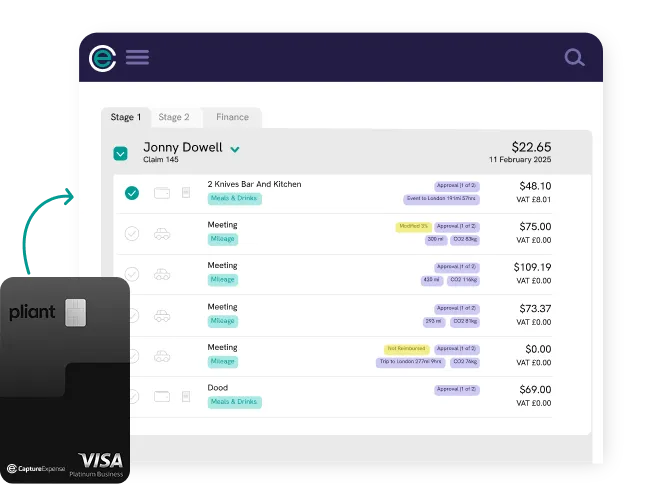
Capture receipts through the app, WhatsApp, Teams, Slack or desktop. Each card transaction is matched to the right receipt automatically, missing receipts are spotted instantly, and reminders remove the follow-up emails. Coded transactions post into your accounting system the same way as every other card programme.
- Automatic receipt matching with AI and OCR
- Unreceipted transactions flagged and chased automatically
- Posted to the ledger with VAT and cost centres, audit-ready
2 Knives Bar and Kitchen
Newcastle upon Tyne
Capture Expense
- Fri 24 Apr 2 Knives Bar and Kitchen £48.10
- Thu 23 Apr Tesco £12.40
- Tue 21 Apr Amazon £31.99
- Type
- Incidental expense
- Category
- Meals and drinks
- VAT
- £8.01
- Amount
- £48.10
Spend anywhere
Global spend, local control
Pay wherever Visa is accepted, from one platform. Spend and get billed in the same currency to cut conversion costs and protect the business from unfavourable exchange rates. Keep your existing corporate bank account and cards alongside: Capture Expense reconciles Pliant cards and your current card programmes at the same time.
- Accepted wherever Visa is, with same-currency billing
- Works alongside existing corporate cards and bank feeds
- Credit limits with flexible billing cycles, subject to Pliant's assessment
Book a demo
See expense cards on your own process in 30 minutes
Bring a couple of real claims and your finance system. We will show you how each one flows from receipt to ledger.
Rated 4.9 out of 5 on Capterra No credit card for the trial Reply within one working day
In detail
How Capture Expense and Pliant work together
-
1. Create your card
Choose virtual, single-use, physical or premium, set the currency and validity, and assign it to a person or project.
-
2. Set limits and controls
Spending categories, date ranges and transaction limits, adjustable at any time.
-
3. Spend and track
Every transaction syncs automatically, whether it is online spend, a subscription or a supplier payment.
-
Receipts matched
Photos from the app or chat find their transaction on their own.
-
Policy applied
Built-in spending controls stop cardholders breaking policy.
-
Posted to the ledger
Coded and reconciled into your accounting system like any other card.
Trusted by finance teams across the UK and Ireland




























Questions
Frequently asked questions
Can't find what you're looking for? Talk to us and we'll answer within a working day.
What are business expense cards?
What credit limits are available?
Can we keep our existing corporate bank account and cards?
Do pre-funded cards work like prepaid debit cards?
Can a business card be used for personal spend?
Who issues the cards?
Works with
Related parts of the platform
Corporate cards
Import transactions from the cards you already use, match receipts automatically, post to the ledger with the right VAT.
Learn moreExpense management
Receipts, claims, reimbursements and mileage without the admin, on web, mobile or chat.
Learn moreApprovals and policy
Multi-stage Approval Records, line manager routing, category overrides, spend limits and alerts.
Learn moreFrom the blog
Further reading
- Guidance on HMRC Record Keeping in the UK Good record keeping is essential for staying compliant. Here’s all you need to know for HMRC record keeping in the UK. Insights · Feb 2026
- An Overview of Employee Expense Reimbursement Law in the UK Learn about different reimbursable expenses, employee expense reimbursement law in the UK, and our tips to help keep you HMRC compliant. Insights · Sept 2024
See a card issued and reconciled in one demo
We will create a virtual card, make a test transaction and show the receipt matched and posted, all within the call.
Rated 4.9 out of 5 on Capterra No credit card for the trial Reply within one working day